Case study · 2026
College Compass
College Search & Application Tracker · Full-stack web application
A guest-first workspace for the college search: real federal data on 1,900+ colleges, a balanced reach/target/likely list, transparent match scores, and an application tracker — no account required.
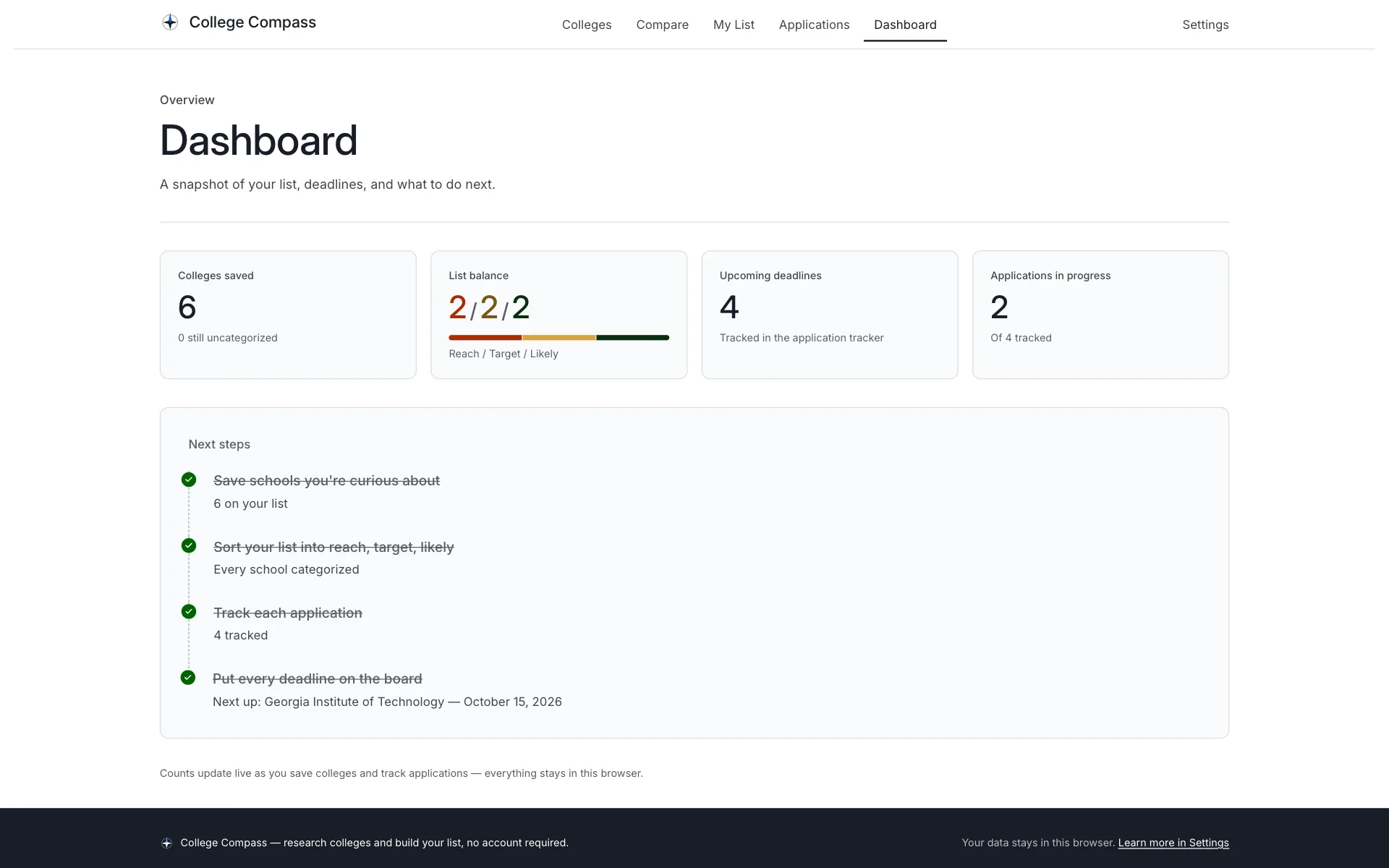
01Overview
The whole college search in one place
College Compass is a college directory, list builder, comparison tool, and application tracker for high-school students. It searches real U.S. Department of Education data on 1,900+ colleges, and everything works from the first click — no account, no email, nothing sent to a server. Your list lives in your own browser.
- Search 1,900+ US colleges by name, nickname, or location
- Filters for state, type, size, setting, field of study, tuition, and acceptance rate
- Card and list views, with every search shareable as a URL
- College profiles: admissions, cost, aid, and outcomes
- A saved list sorted into Reach, Target, Likely, or Undecided
- Balance check, private notes, and CSV export
- Side-by-side comparison of up to six schools
- Match scores tuned to your own priorities — every factor explained
- Cautious admission estimates from SAT/ACT ranges and GPA
- Application tracker: statuses, deadline types, and dates
- A six-item requirements checklist per school
- An optional two-minute preference setup — stored on device
02The problem
Fifty open tabs and a spreadsheet
The college search usually lives in fragments: ranking sites with opaque scores, brochure pages with the numbers buried, a spreadsheet for the list, and a notes app for deadlines. Most tools also demand an account before they show anything useful — the student pays with an email address just to look around.
College Compass puts the loop in one place — search, shortlist, compare, track — on top of the same federal dataset colleges actually report to. Scores are computed from the student's own priorities and every factor shows its reasoning, and the whole product works without signing up for anything.
03The solution
The central workflow
- Set your preferences — optional, about two minutes: GPA, scores, majors, budget, and what matters most.
- Search and explore — filter 1,900+ colleges by what matters; every card shows a match score and an admission category.
- Save the contenders — one click keeps a school on your list, stored right in the browser.
- Sort into reach, target, likely — a balance check keeps the list honest: a stretch, a match, a safety.
- Compare what matters — up to six schools side by side, best values highlighted, missing data shown honestly.
- Track every application — statuses, deadline types, dates, and a requirements checklist per school.
04Core features
Four surfaces, one search
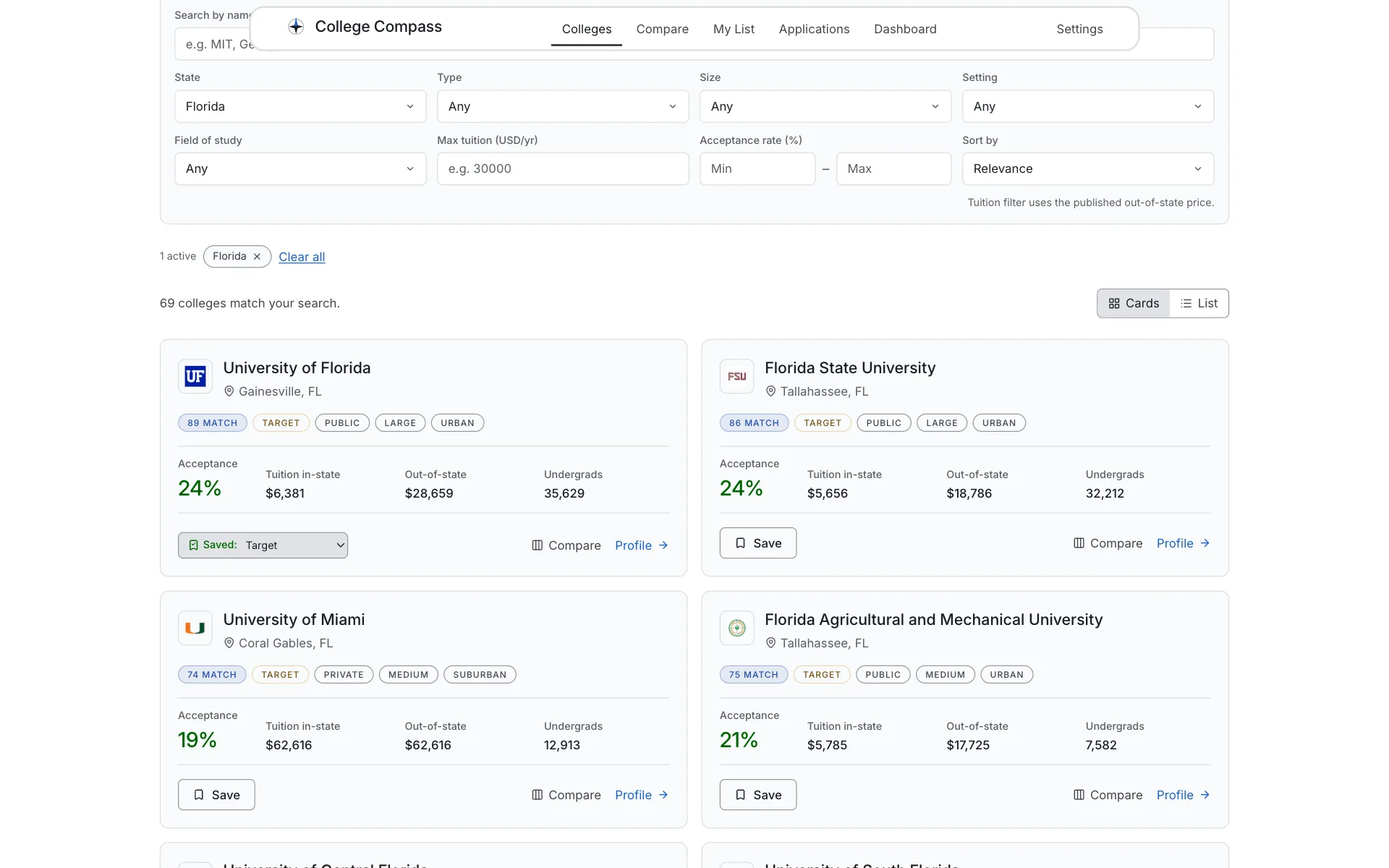
Directory cards with live match scores and admission categories
Explore
Search that works before JavaScript loads
The directory is a real form that server-renders its results, then upgrades in the browser to instant as-you-type search with debounced URL sync — so any filtered view can be shared as a link. Cards show the data that matters up front: acceptance rate, tuition, size, and your personal match score.
Why it mattersA search you can link to is a search you can send to a parent or counselor.
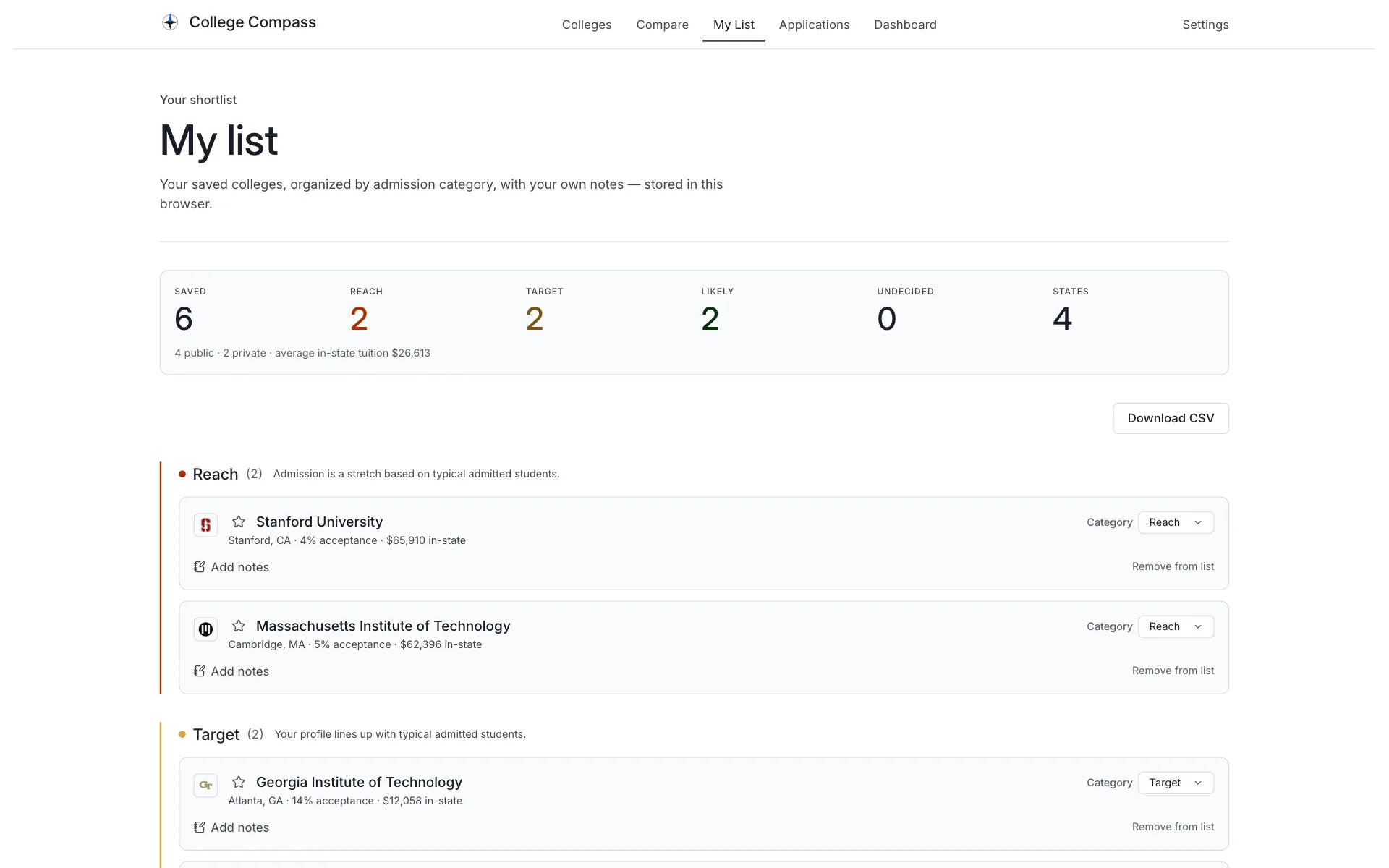
Six schools, balanced 2 / 2 / 2 across reach, target, and likely
My list
A shortlist that stays balanced
Saved schools are sorted into Reach, Target, Likely, or Undecided, with private notes per school and a summary band that makes an unbalanced list obvious at a glance. The whole list exports to CSV — it's the student's data, so it leaves with them.
Why it mattersThe classic college-list mistake is six reaches and no safety — the balance check makes it visible before deadlines do.
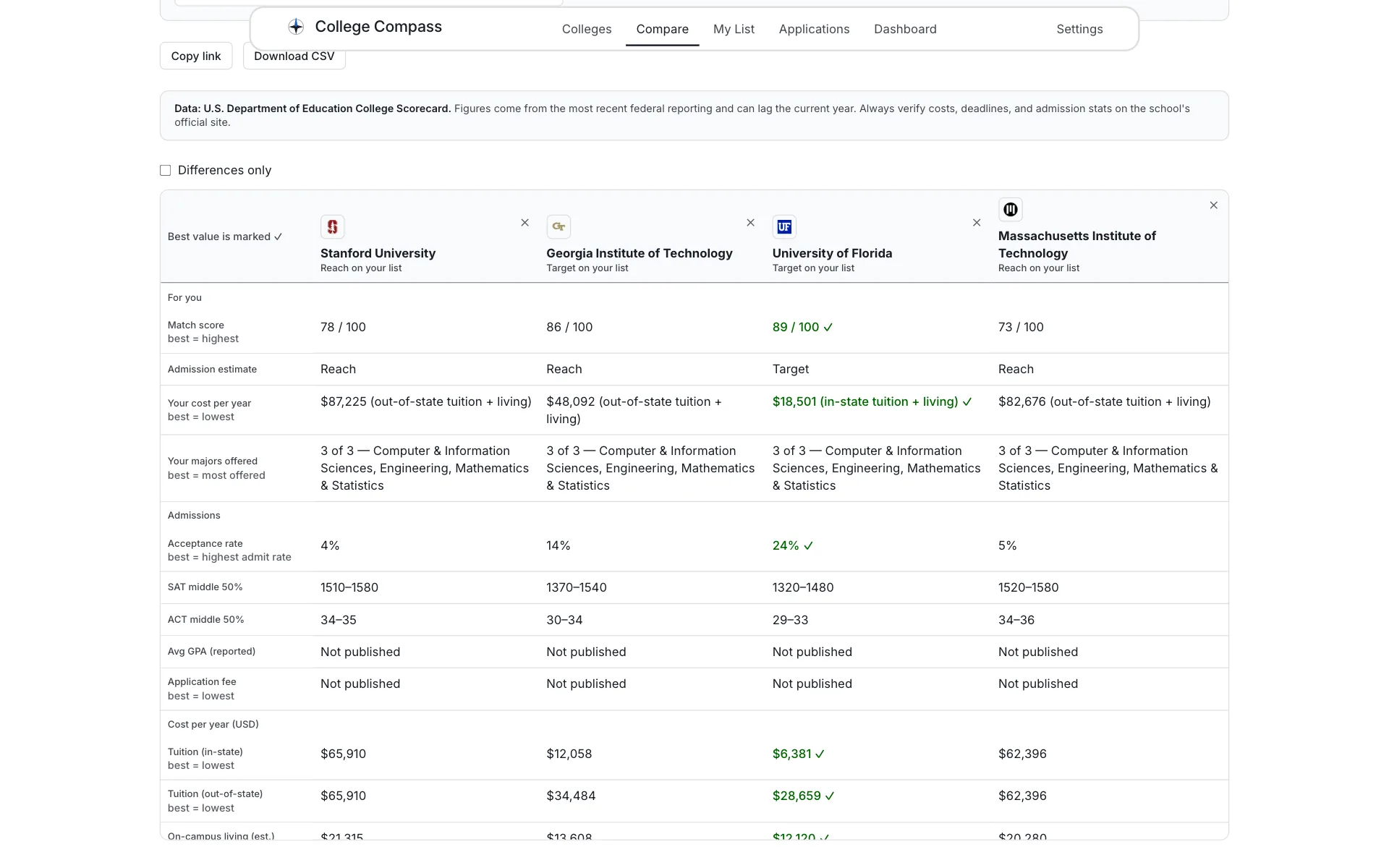
Four schools side by side — best value per row gets the check
Compare
Side by side, with honest gaps
Up to six schools line up across admissions, cost, aid, and outcomes, with the strongest value in each row highlighted. When a school doesn't publish a number, the table says "Not published" — missing data is never dressed up as a zero. The whole comparison is a copyable link.
Why it mattersDecisions made on silently-missing data are worse than no comparison at all.
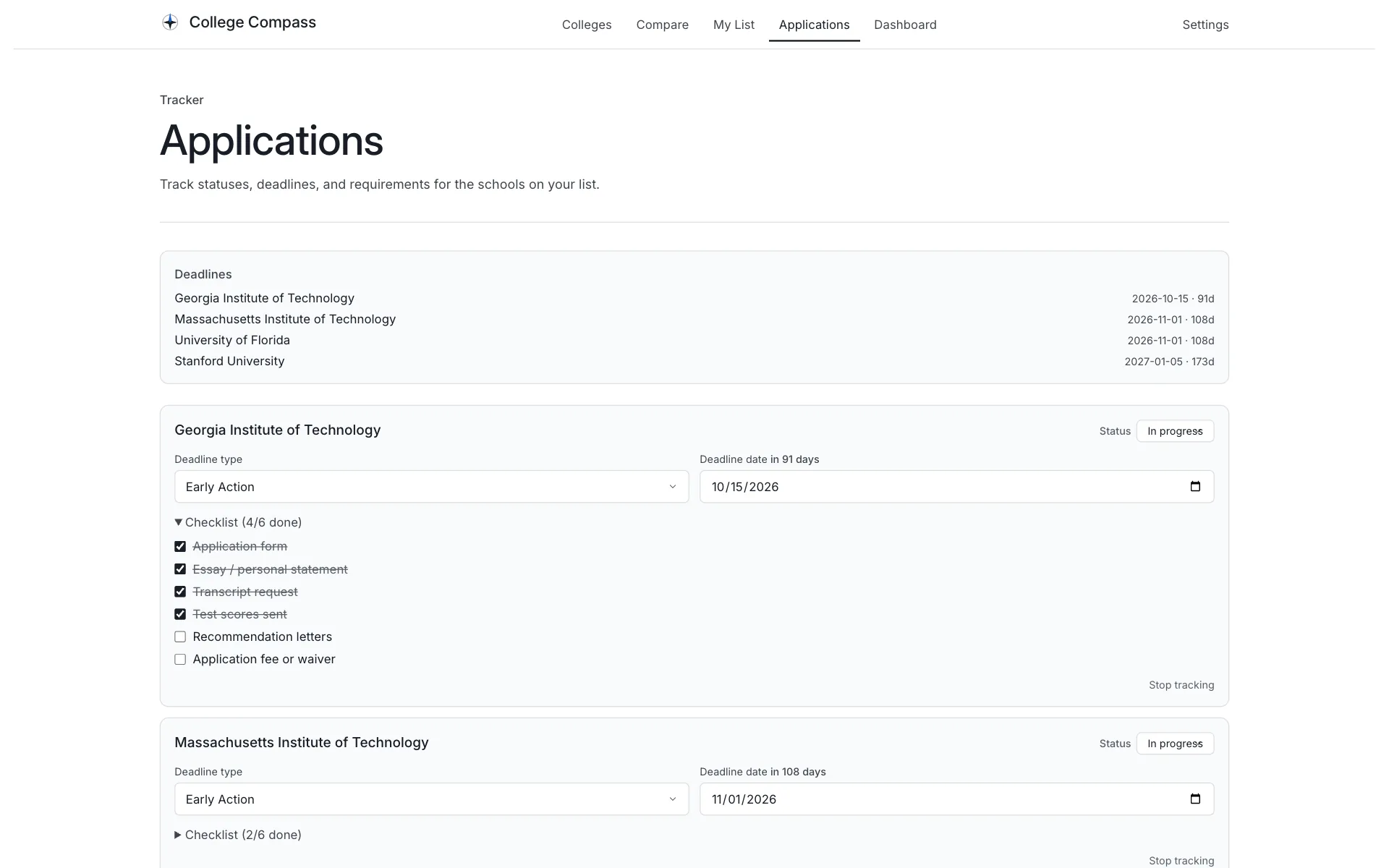
Deadlines with day counts, statuses, and a checklist per school
Applications
Every deadline on one board
Each tracked school carries a status from "not started" through "submitted" to a decision, a deadline type — Early Action, Early Decision, Regular, Rolling — with a date and live day count, and a checklist covering essays, transcripts, test scores, recommendations, and fees.
Why it mattersApplication season is a logistics problem — the tracker turns it into a list you can finish.
05Product tour
From landing page to a balanced list
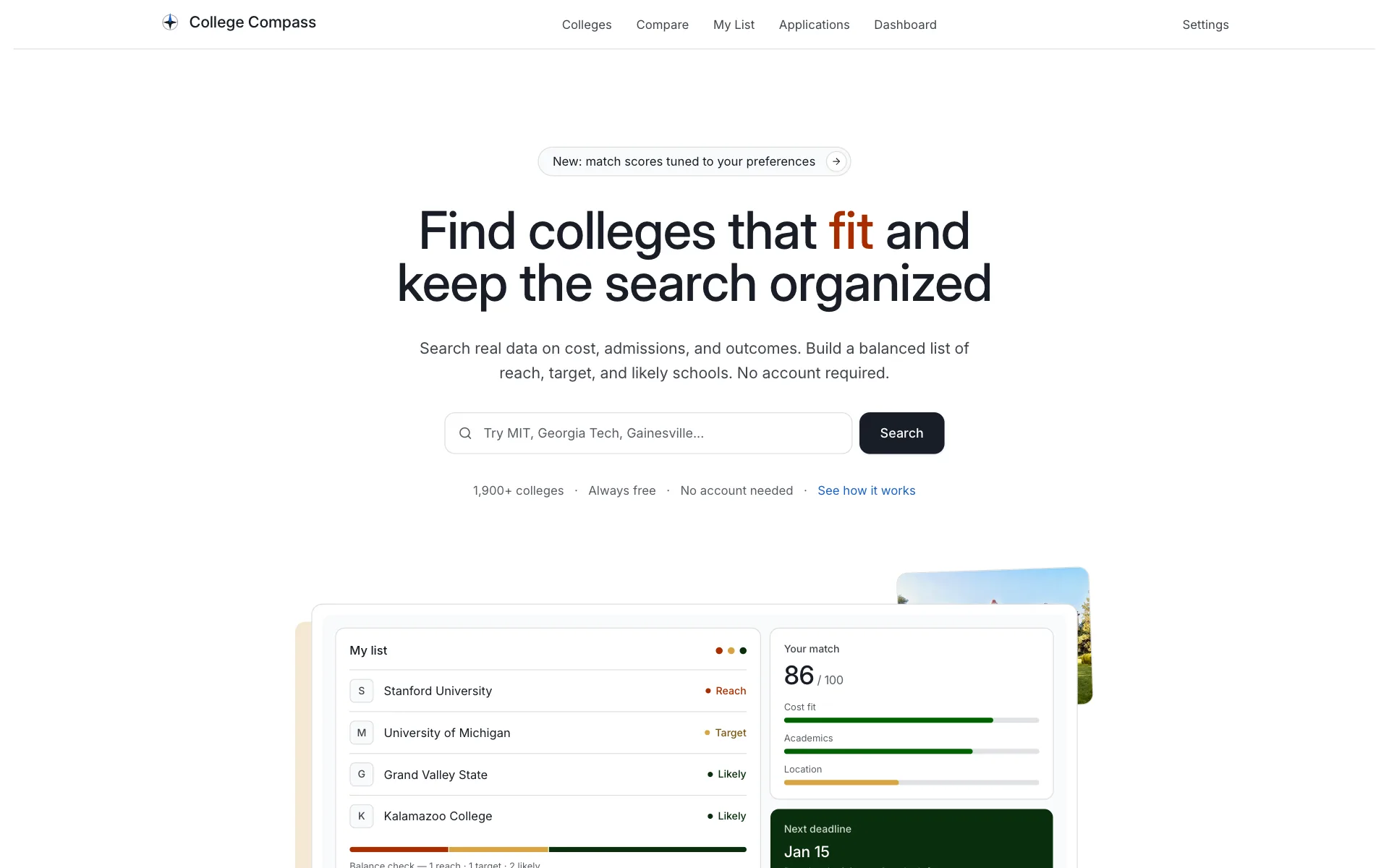
The public landing page — search 1,900+ colleges before creating anything
A typical first run
- Land — and start searching immediately; no sign-up gate.
- Personalize — optionally answer a few questions so match scores reflect you.
- Explore — filter by state, cost, majors, and campus setting.
- Save — keep the contenders and sort them into reach, target, likely.
- Compare — line up the finalists and check the honest numbers.
- Track — put every deadline and requirement on the board.
06Design decisions
Honest by default
- Every score explains itself. Match scores are a plain weighted average of the student's own 0–5 priorities, and every factor reports why it scored what it did — or why it couldn't be scored. No hidden factors, no AI, no black box.
- Missing data looks missing. Schools that don't publish a number get "Not published" — never a zero, never a guess. The data source (the federal College Scorecard) is named on every page that uses it.
- Guest-first, not guest-limited. The full product — search, list, compare, tracker — works without an account. Nothing is held back to force a sign-up, because there is nothing to sign up for.
- Privacy is a feature, stated in the footer. Preferences, lists, and applications never leave the browser. "Your data stays in this browser" appears on every page, and Settings can export or erase everything.
- Estimates stay humble. Admission categories are cautious: a sub-15% acceptance rate is a reach for every applicant, and the app says "estimate from published ranges — never a prediction."
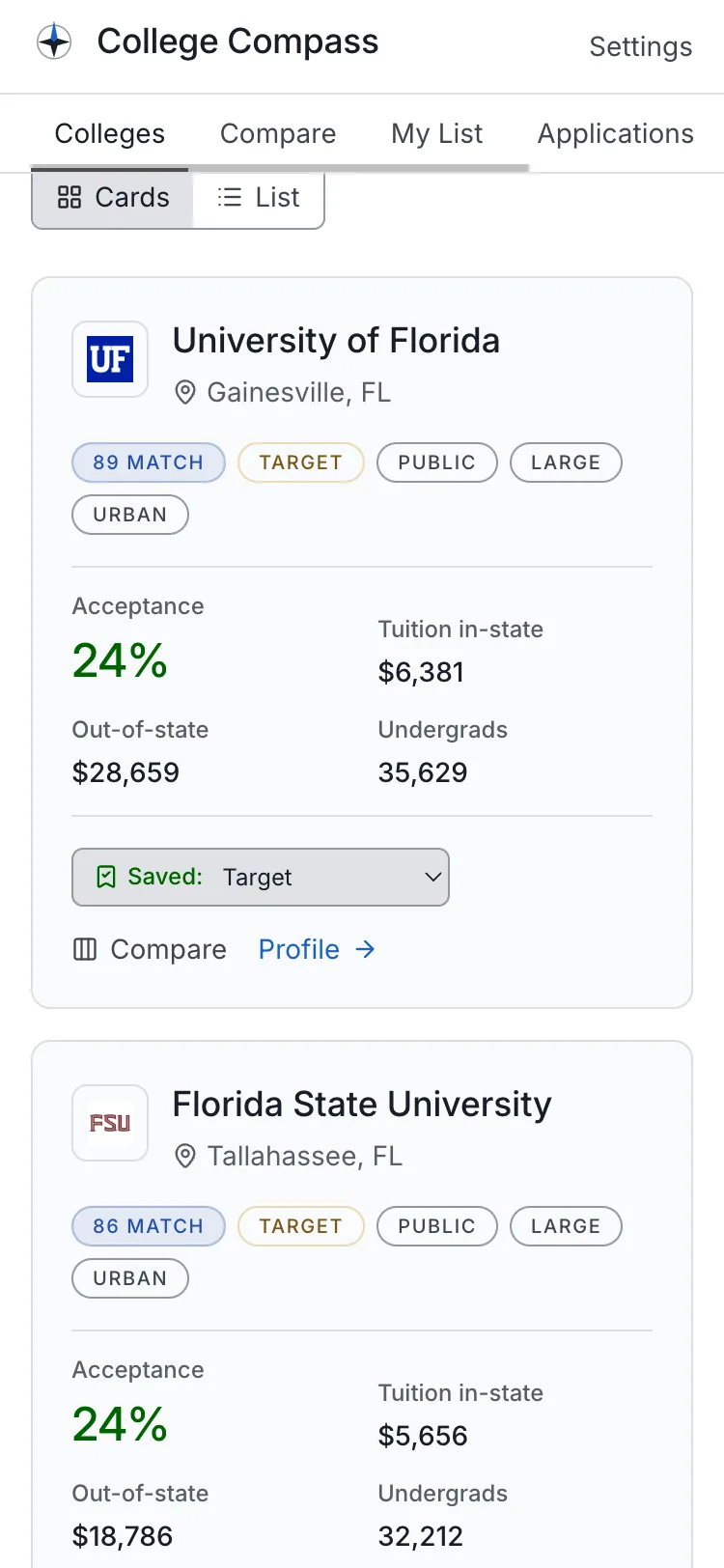
- Mobile is a first-class layout, not a shrunk desktop. Cards restack, filters collapse, and controls grow to touch size, as in the phone view above.
07Technical implementation
The stack, verified from the repository
I built every layer of College Compass myself — the interface, the scoring engines, the data pipeline that imports the federal dataset, the database schema, and the deployment. The architecture is deliberately two-tier: college reference data lives in PostgreSQL, but the student's personal data lives entirely in their own browser and never touches a server.
- Framework
- Next.js 16 (App Router) · React 19 · TypeScript
- Styling
- Tailwind CSS 4 with design tokens, class-variance-authority, and a small library of hand-built UI primitives; Lucide icons
- College data
- PostgreSQL (hosted on Supabase) via Prisma 7 — 1,944 US colleges imported from the U.S. Department of Education College Scorecard by an idempotent streaming import script
- Personal data
- IndexedDB in the browser via Dexie, behind a repository interface with cross-tab reactivity, versioned schema upgrades, and export/import backups that migrate old versions forward
- Validation
- Zod 4 schemas on every write — and re-validated on read as defense in depth; react-hook-form for forms
- Match engine
- Pure TypeScript functions: a transparent weighted average over the student's priorities, with per-factor reasoning and honest "can't score this" states
- Search
- Progressively enhanced — a no-JavaScript GET form that server-renders identical results, upgraded to instant client search with URL sync and infinite scroll
- Motion
- Motion (Framer Motion's successor) and React Spring, behind a reduced-motion check
- Testing
- Vitest — ~216 unit tests across 24 files covering the match and admission engines, backup migrations, repositories (against a fake IndexedDB), filtering, and CSV export
- Deployment
- Cloudflare Workers via OpenNext, on a custom domain, minified to fit the free-plan worker size cap
08Technical challenges
Three problems worth solving properly
A no-account app that still keeps data safe
- Challenge
- "No account required" means the student's list, preferences, and applications have to live in the browser — across tabs, upgrades, and the day they clear the wrong thing.
- Why it mattered
- Losing a senior's college list in November is unforgivable. Local-first is only a feature if it's dependable.
- Approach
- All personal data sits behind one repository interface backed by IndexedDB, with watch-based reactivity so every tab updates live, a versioned schema upgrade chain, and an export/import backup format whose old versions are migrated forward through a keyed chain of migrations. The same Zod schemas validate data on write and again on read.
- Result
- The full product works offline-ish and account-free, survives schema changes, and a backup file from an old version still restores today.
- What I learned
- Local-first doesn't remove the data layer — it moves all of a backend's discipline (migrations, validation, backups) into the client.
Instant search that also works with JavaScript off
- Challenge
- A directory of ~2,000 colleges with eight filters should feel instant, keep the URL shareable, and still return results if JavaScript never loads.
- Why it mattered
- Search is the front door of the product — and a filtered view a student can't send to a parent or counselor is a dead end.
- Approach
- The explorer is a real GET form that server-renders results, then upgrades: client-side filtering buffered with React's
useDeferredValue, the URL kept in sync with debouncedhistory.replaceState, and infinite scroll via IntersectionObserver. The filter and ranking logic is pure TypeScript shared by both paths, so no-JS and instant search give identical answers. - Result
- Typing filters the directory live, every state is a copyable link, and the same page still works as a plain HTML form.
- What I learned
- Progressive enhancement is an architecture, not a fallback — sharing the pure logic between server and client is what makes the two paths honest.
Match scores a student can actually trust
- Challenge
- Ranking sites score colleges with formulas nobody can inspect. A personal match score is only useful if the student can see exactly why a school scored 86.
- Why it mattered
- An opaque number steering a life decision is worse than no number. Trust was the whole point of building scoring at all.
- Approach
- The engine is a set of pure functions: each factor — cost fit, academics, majors offered, location, and more — produces a 0–100 score with a human-readable reason, or an explicit "no data" / "opted out" state, and the total is a plain weighted average of the student's own 0–5 priorities. Tuition picks in-state vs out-of-state from the home state. The admission estimator is deliberately cautious and never compares weighted GPAs. All of it is unit-tested.
- Result
- Every score expands into its full reasoning, unscored factors say why, and the numbers are deterministic — the same inputs always give the same honest answer.
- What I learned
- Transparency is a design constraint that shapes the code: reasons aren't a UI garnish, they're part of the engine's return type.
09Outcome
Shipped and live
College Compass is deployed and running at compass.zayd-aziz.com (opens in a new tab). Anyone can search 1,944 real colleges, build and balance a list, compare schools side by side, and track every application and deadline — free, on any device, without creating an account.
10Reflection
What I'm taking with me
The technical lessons are in the challenges above. The personal ones are mine to write — placeholders below so this section stays honest until I do.
Why did you build a college search tool in the middle of your own college search?
Which part taught you the most — the data pipeline, the scoring, or the local-first storage?
What would you change if you rebuilt College Compass from scratch?
What feedback have real students given you so far?
What feature is next — and what will it take to build?
Try College Compass
The fastest way to judge it is to search a school you know — no account needed.