Case study · 2026
EnginX
Student Engineering Community · Concept website
A one-page home for a student engineering community — what it is, what it has run, what is coming up, and how to support it.
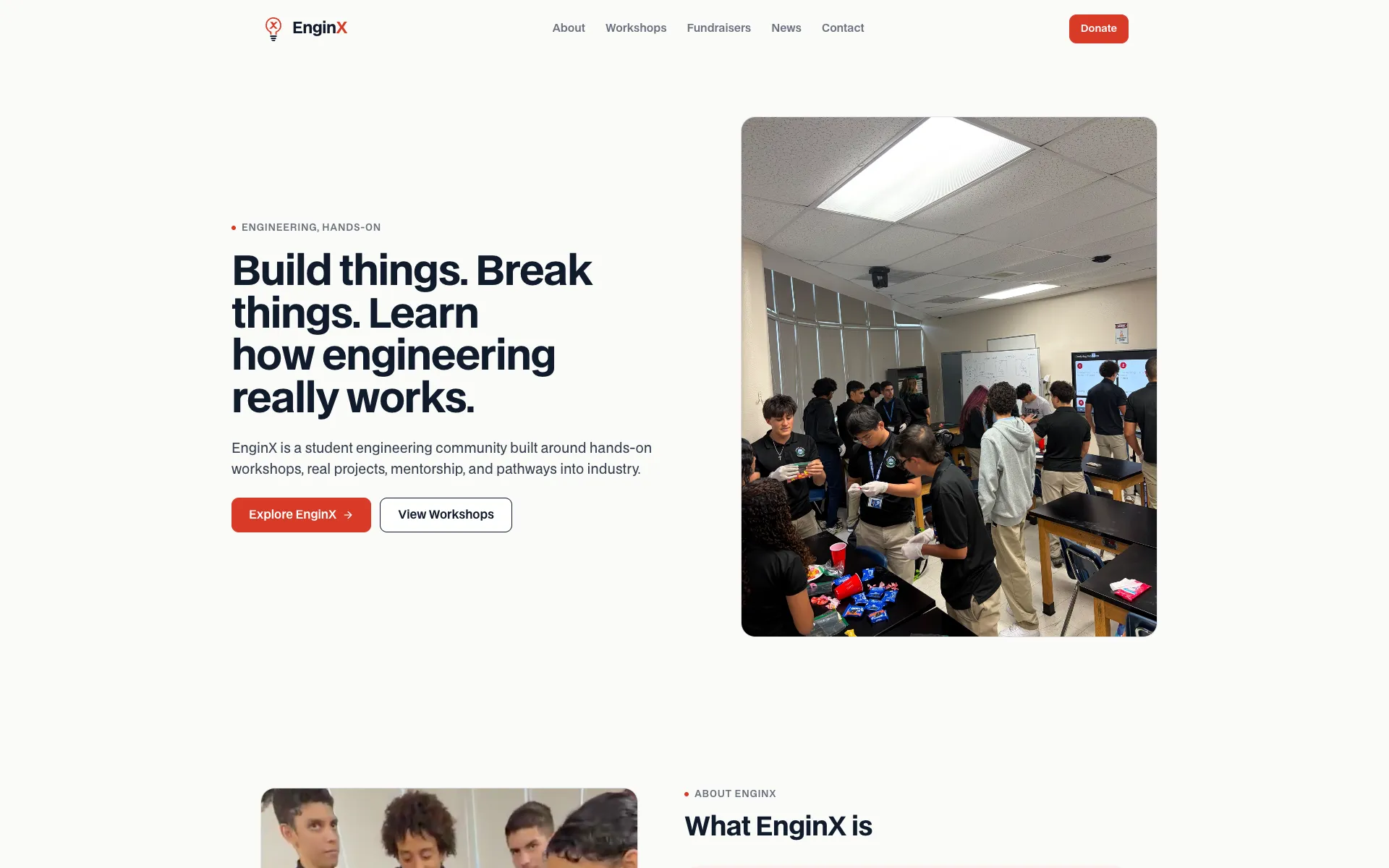
01Overview
One page that explains the whole organization
EnginX runs hands-on engineering workshops for high school students in Pembroke Pines, Florida. Its mission is "educating high school students on the branches of engineering in order to aid them in deciding their future." I designed and built a homepage for it: a single scrolling page covering the mission, past workshops, upcoming fundraisers, news, and ways to donate or get in touch.
It is a concept site, and says so in its footer — built to show EnginX what its web presence could be, and hosted on a temporary address until the organization has its own.
- Hero, mission, and four program pillars
- Workshop cards with date, discipline, and recap
- Fundraiser card with entry, location, and format
- News feed with a featured story and event flyer
- Scannable QR code for the event group chat
- Donate and contact calls to action
- Sticky navigation that tracks the current section
- Reading-progress line under the navigation
- Looping workshop video with a pause control
- Its own written design system and logo mark
- Every word of copy editable in one file
- Fully static — no server, database, or API
02The problem
A social feed is not a front door
EnginX's updates live on Instagram, its donations on GoFundMe, and its event details on a flyer with a group-chat QR code. Each piece works, but nothing ties them together. A student, parent, or sponsor hearing about EnginX for the first time has no single place that answers the basic questions: what is this, what have they done, what is happening next, and how do I help?
The site's job is to be that place. It doesn't replace the tools EnginX already uses — it points to them, in an order that makes sense to someone who has never heard of the organization.
03The solution
A page ordered by a visitor's questions
- Hero — one sentence on what EnginX is, with a real workshop photo beside it.
- About — the mission statement and four pillars: hands-on learning, community, mentorship, career pathways.
- Workshops — what has actually been run, with the discipline, date, and a recap.
- Fundraisers — the next event, with everything needed to show up: date, fee, address, format.
- News — announcements and recaps, with the newest story featured.
- Donate & contact — the GoFundMe campaign, email, and Instagram, last, once the case is made.
04Core features
Three sections doing the work
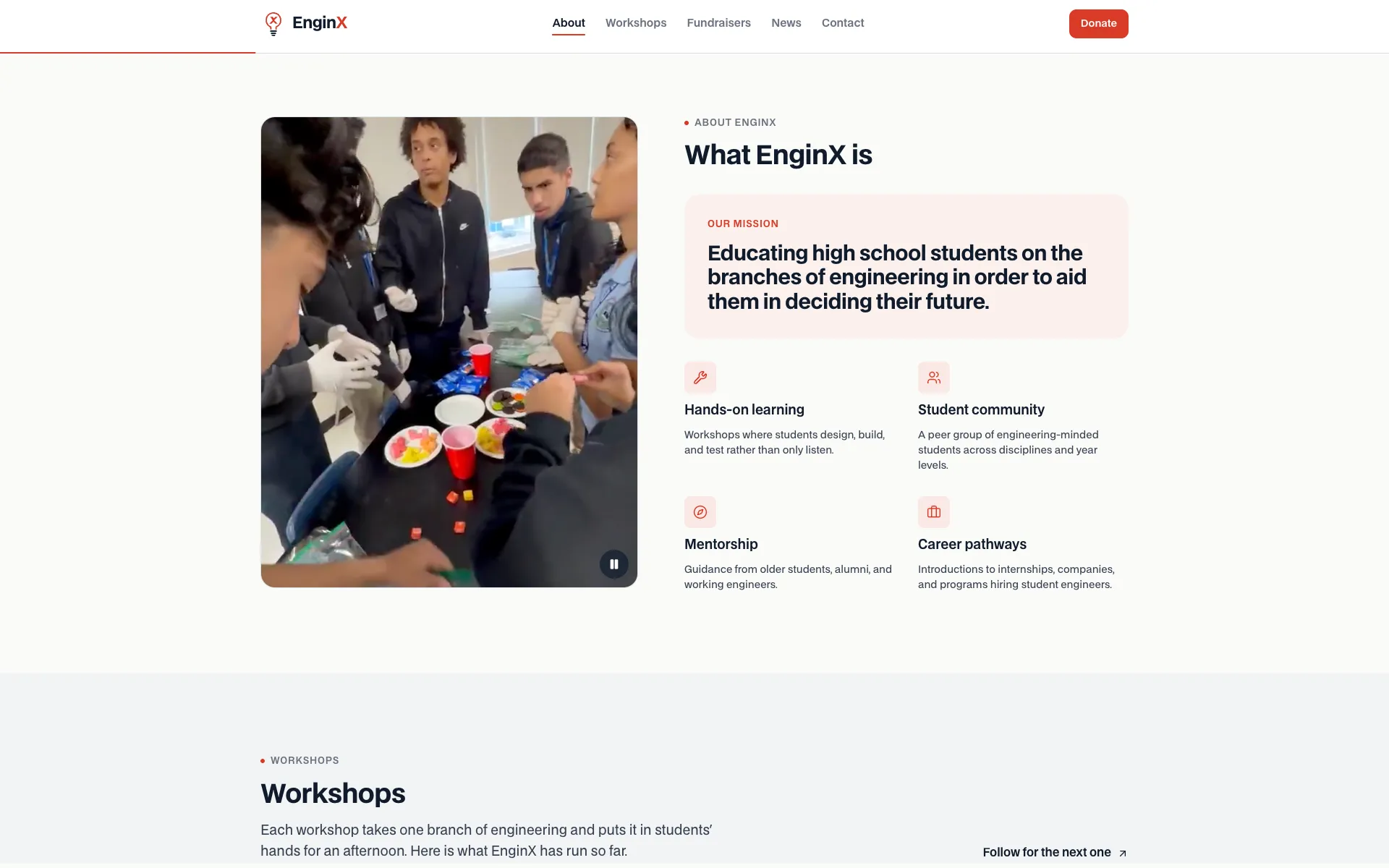
The mission, with workshop footage playing beside it
About
The mission, stated once and clearly
The official mission statement sits in its own highlighted card, with four pillars underneath. A muted, looping clip from a real workshop plays alongside, with a pause button — and it doesn't autoplay for visitors who prefer reduced motion.
Why it mattersFootage of students actually building something says "hands-on" faster than any paragraph can.
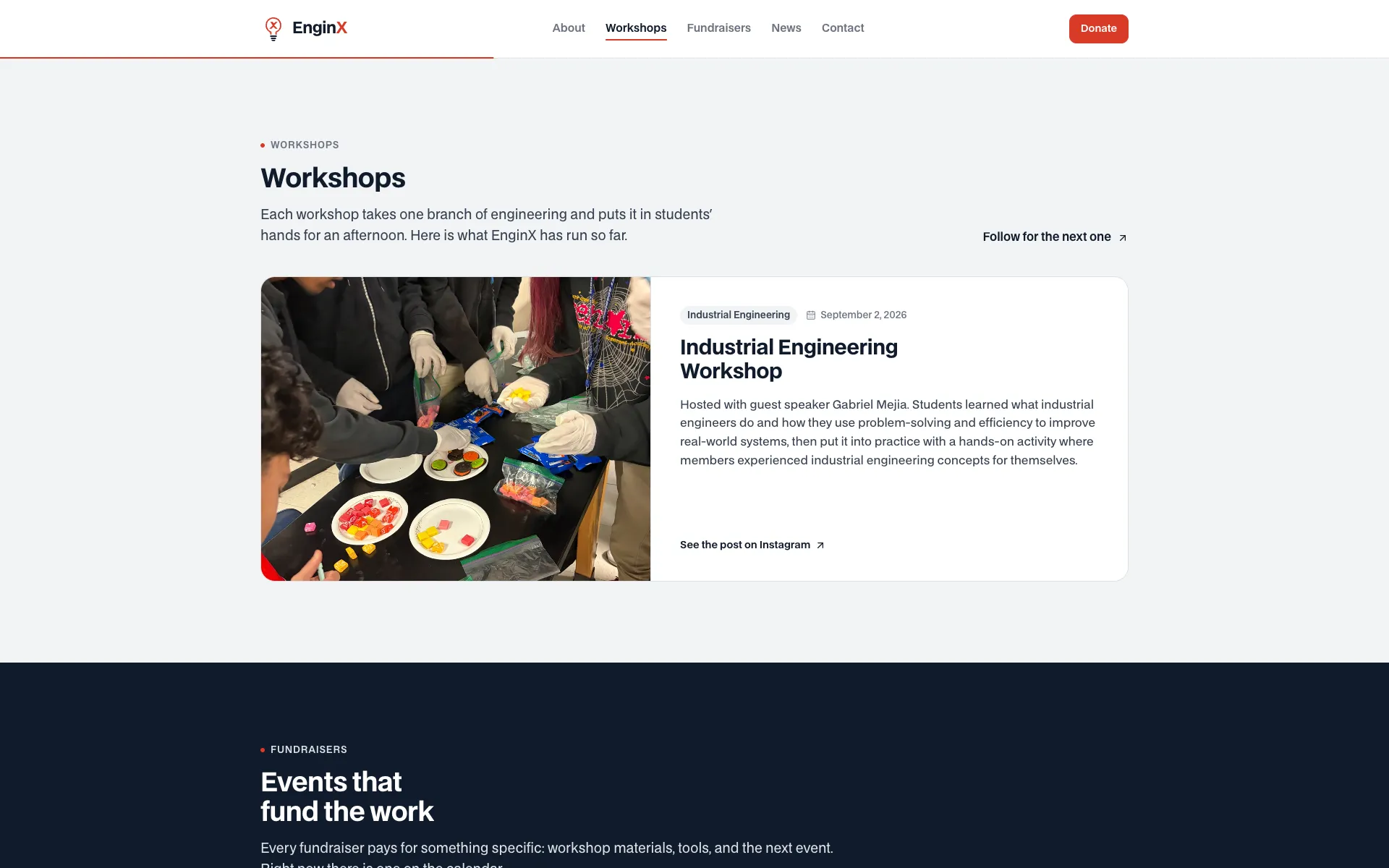
The first workshop as a wide featured card
Workshops
A record of what has been run
Each workshop is a card with its engineering discipline, date, a short recap, and a link to the original post. The first entry renders as a wide featured card; later ones fill a grid beneath it, so the section looks complete with one workshop and still works with ten.
Why it mattersA young organization has a short history — the layout shouldn't make that look like an empty shelf.
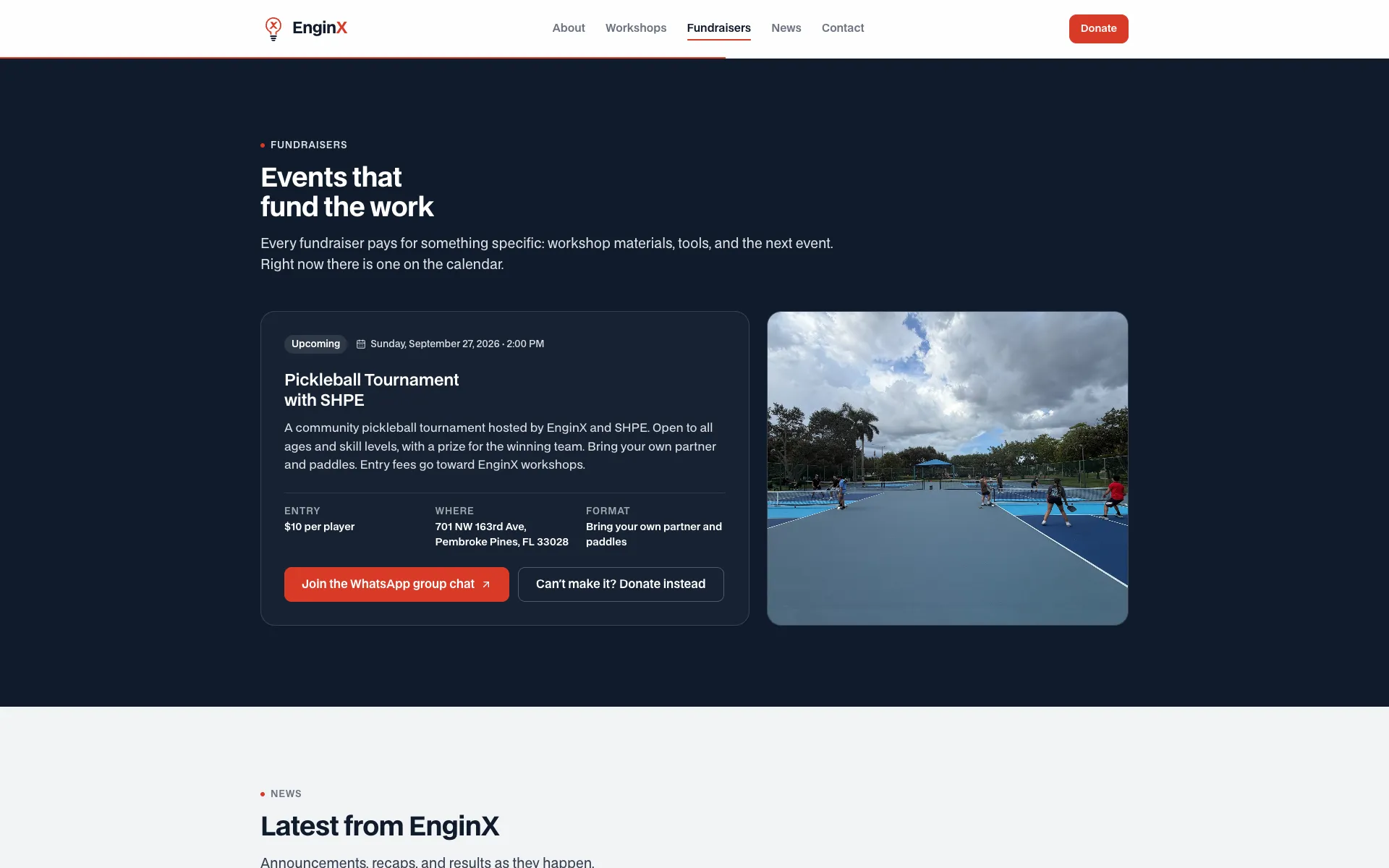
The one dark band on the page, reserved for the next event
Fundraisers
Everything needed to show up
The upcoming fundraiser gets the page's only dark section. The card answers when, where, how much, and what to bring, then offers two actions: join the event's group chat, or donate if you can't make it. A progress bar toward a goal appears only when a fundraiser actually has one.
Why it mattersAn event announcement that leaves out the address or the fee just creates a question someone has to answer by hand.
05Product tour
The same page on a phone
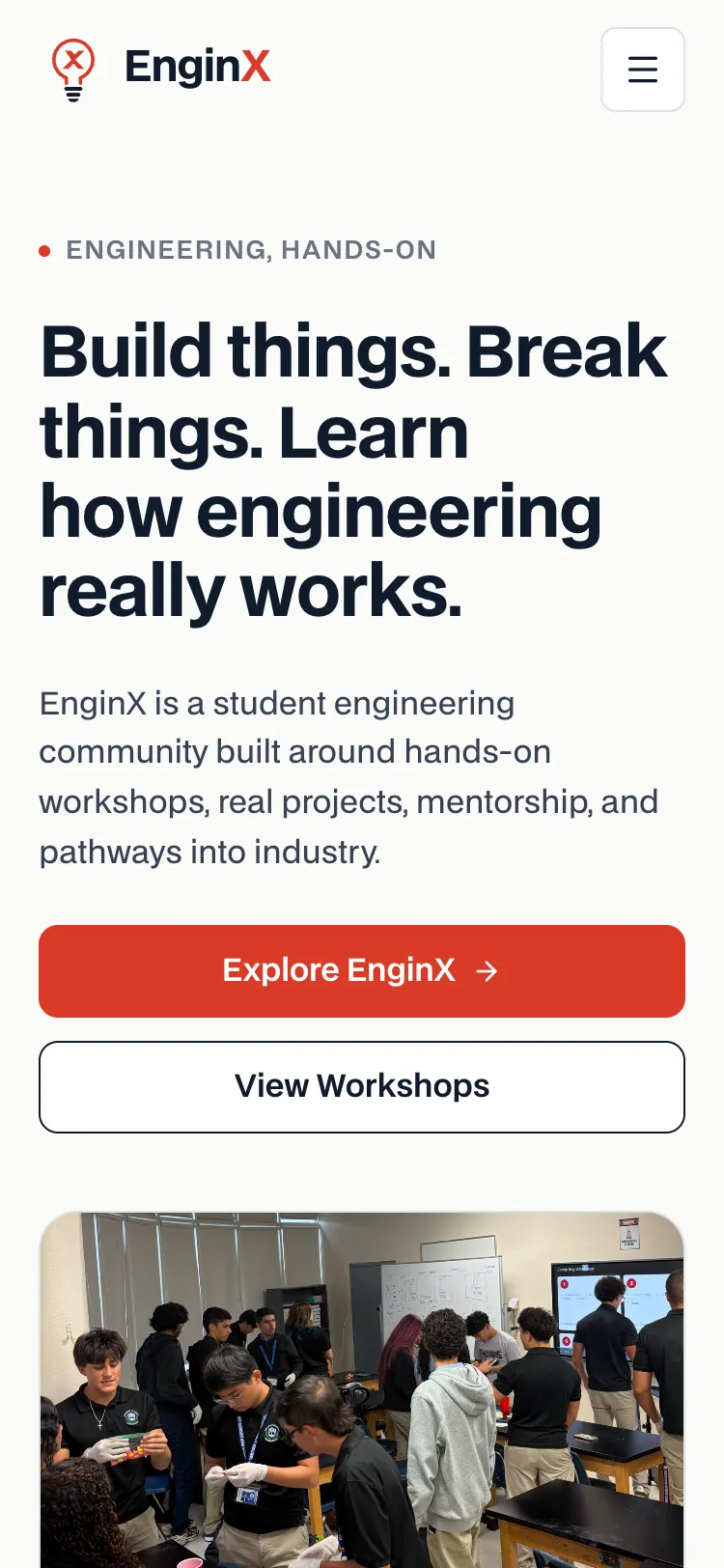
Built for the link in a bio
- Arrive — most visitors will tap through from Instagram, on a phone.
- Read — the headline and both buttons fit above the photo, full width and easy to tap.
- Navigate — the menu button opens a panel; Escape or a tap outside closes it.
- Scroll — sections stack into a single column, and a thin line under the header shows progress down the page.
- Act — join the group chat, open the GoFundMe, or send an email, each one tap away.
06Design decisions
Neutral page, one accent
- I wrote the design system before the components. Colors, type scale, radii, shadows, and breakpoints were decided in a design document first, then implemented once as tokens. Every component reads from those tokens.
- Red is an accent, not a background. EnginX's red-orange is kept to buttons, active states, and small highlights. The page itself is warm off-white with deep navy text, so the red always means "act here."
- Real photos or nothing. The first prototype used neutral captioned placeholders instead of stock imagery. Once EnginX's own photos and video arrived, they dropped into layouts that were already sized for them.
- Nothing invented is presented as fact. Early demo content was tagged as demo data in the interface. Sections without real content yet — members, opportunities, a tournament bracket — are built but left off the page rather than padded with made-up entries.
- Motion is quiet and optional. Sections fade in once as they enter view. With reduced motion turned on, everything is simply visible and the video waits to be started by hand.
- The footer says what the site is. It is labeled as a concept website, not an official EnginX publication, so no visitor is misled about who speaks for the organization.
07Technical implementation
The stack, verified from the repository
EnginX is a front-end project, and deliberately so: there is no server, no database, and no API. The build produces plain HTML, CSS, and JavaScript, which keeps hosting free, the page fast, and the handoff simple for a student organization with no one on call.
- Framework
- Next.js 16 (App Router) · React 19 · TypeScript, built as a static export
- Styling
- Tailwind CSS 4, with the design tokens defined once in a single
@themeblock and custom breakpoints at 480, 744, 1128, and 1440px - Content
- One typed TypeScript file holds all copy, links, dates, and image references — components contain only fixed interface labels
- Typography
- BDO Grotesk, self-hosted under the Open Font License
- Motion
- A small reveal component built on IntersectionObserver, with reduced-motion handled in CSS; the progress line writes straight to a transform so scrolling never re-renders the navigation
- Icons
- Lucide, plus a hand-drawn SVG logo mark
- SEO
- Canonical URL, Open Graph image,
robots.txt, and sitemap generated at build time from one site-URL variable - Accessibility
- Skip link, visible focus rings, 44px touch targets, and contrast-checked color on the dark band
- Deployment
- Cloudflare Pages, by direct upload with Wrangler; long-lived cache headers on hashed static assets
08Technical challenges
Three problems worth solving properly
Designing before the content existed
- Challenge
- The first version was built ahead of any real photos, copy, or facts from EnginX — but a page of lorem ipsum can't be judged, and invented facts about a real organization are worse.
- Why it mattered
- The prototype had to be convincing enough to react to, without claiming anything untrue.
- Approach
- All content went into one typed file, with every placeholder labeled in place and a visible "demo data" badge in the interface. Image slots rendered captioned placeholders at their final aspect ratios. I kept a checklist of questions, each tied to the placeholder it would unblock.
- Result
- When real content arrived, replacing the demo data was an edit to a single file — no component changes — and the layouts held.
- What I learned
- Separating content from components isn't only tidy code; it's what makes a prototype safe to show and quick to make real.
Shipping Next.js with no server
- Challenge
- Next.js assumes a server by default. Its image optimizer needs one, and current Wrangler versions try to migrate a Pages project to a Workers setup that rewrites the project's configuration.
- Why it mattered
- A student organization needs hosting that costs nothing and has nothing to maintain.
- Approach
- The build uses static export with image optimization turned off, so files are served as-is. The site URL is a single build-time variable feeding the canonical link, social tags, robots file, and sitemap. I documented the exact create and deploy commands, including the flag that avoids the unwanted migration.
- Result
- One command builds and publishes the site, and the whole output is a folder of static files.
- What I learned
- Read what a tool is about to do before letting it do it — and write down the fix the moment you find it.
Making the project easy to hand over
- Challenge
- The site is hosted on my own account at a temporary address. It will need to move to EnginX's own account and domain, possibly run by someone who has never seen the code.
- Why it mattered
- A site only its builder can update stops being updated.
- Approach
- I wrote a handoff document covering the stack, the one environment variable, step-by-step instructions for recreating the project in another account, attaching a custom domain, and verifying a deploy. Publishing is reduced to editing one content file and running one command.
- Result
- The project can change hands without me in the room.
- What I learned
- Documentation is part of the product when the client is the one who has to live with it.
09Outcome
Live, with real content
The site is deployed at enginx-dev.pages.dev (opens in a new tab), carrying EnginX's real mission statement, its first workshop, its upcoming fundraiser, and its own photos and video. It remains a concept site on a temporary address until EnginX decides to adopt it and move it to a domain of its own.
10Reflection
What I'm taking with me
The technical lessons are in the challenges above. The personal ones are mine to write — placeholders below so this section stays honest until I do.
How did you get involved with EnginX, and why did you offer to build this?
How was designing for someone else different from building your own apps?
What did EnginX's team say when they saw it?
What would you change if you started the design over?
What happens next — is EnginX adopting the site?
See EnginX
The fastest way to judge it is to scroll the page yourself.